Operations
Invoices for every stay in HazCheckin: the amount from your PMS and the check-in details, no typing
HazCheckin now issues an invoice for every stay: the amount comes from your PMS, the customer from the check-in and the tourist tax goes outside VAT. How it works, step by step, and which PMS are compatible.
HazCheckin Team
HazCheckin
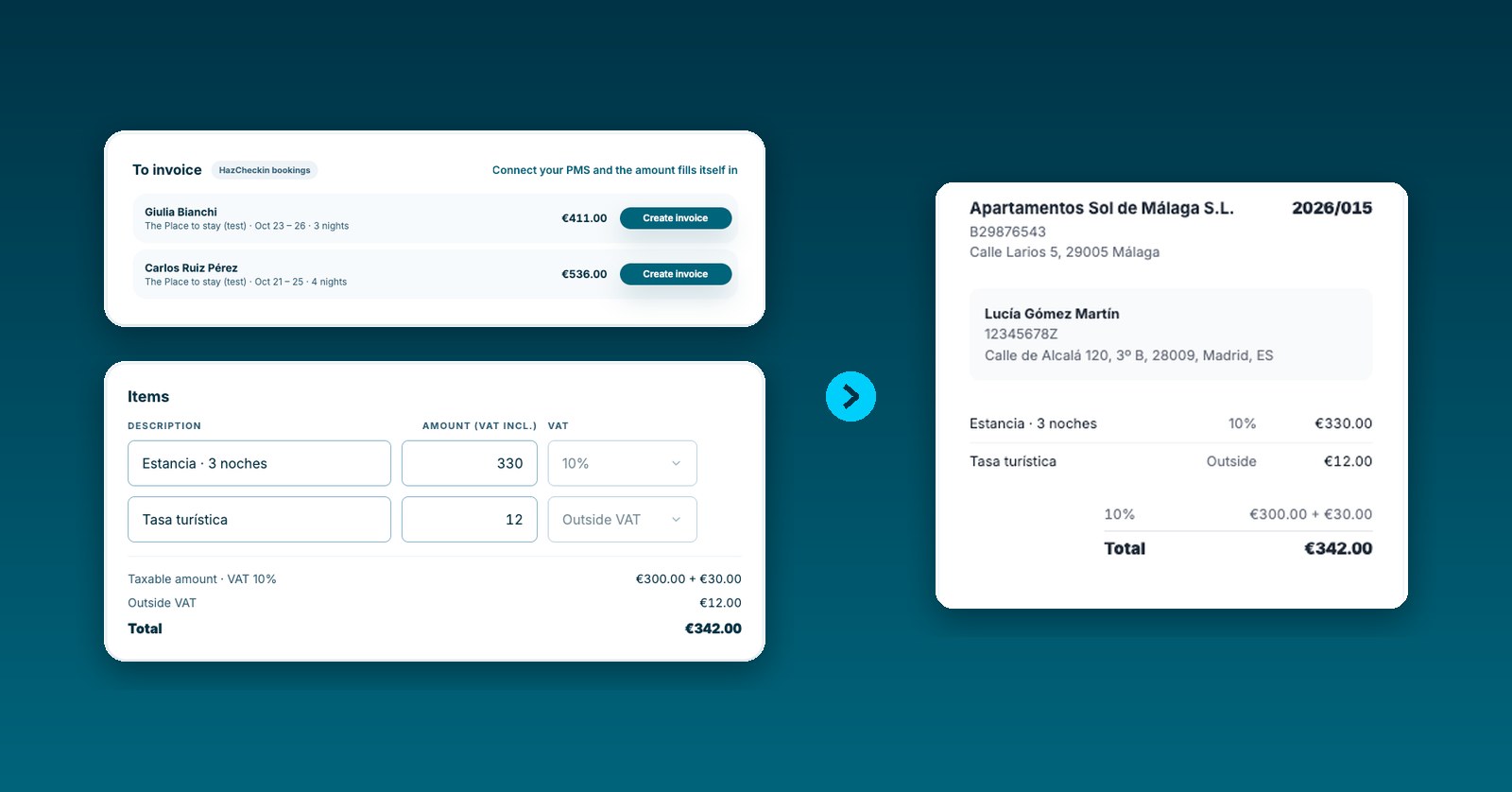
Invoicing a stay usually means copy and paste: the amount sits in your PMS, the guest’s name and ID in the check-in, and the invoice in yet another program. Three places for the same data, and each one is a chance to get it wrong.
From today HazCheckin brings the two together. The booking amount comes from your PMS, the customer details come from the check-in the guest already completed, and all you do is review and issue.
How it works, step by step
- Set up your tax details once. Company name, tax ID, address and the number your invoice series is on. The logo is the one from your branded check-in.
- The stay shows up under “To invoice”. As soon as the booking holder finishes check-in, the stay appears in the list with the amount from your PMS.
- Review the invoice. The customer comes from the check-in: name, address and, if they identified with a Spanish DNI or NIE, their tax ID. The items come from the PMS: the stay with its VAT and the tourist tax on a separate line.
- Issue it. The invoice takes the next number in your series and becomes final.
- Download the PDF. With your logo and the taxable amount and VAT broken down. Every invoice stays under “Issued”.
It all lives in the dashboard, in the new Contracts & Invoices section.
VAT and tourist tax, already split
The amounts a PMS reports are what the guest pays, VAT included. From that total HazCheckin works out the taxable amount and the 10% VAT on accommodation, and the invoice total always matches what the guest paid.
The tourist tax is not part of the accommodation price, so it gets its own line, outside VAT. When your PMS reports it separately, it is already filled in. Otherwise you type it.
Compatible PMS
All eight PMS we connect to bring in the amount of every booking:
| PMS | Tourist tax |
|---|---|
| Lodgify, Hostaway, Guesty, Amenitiz and Mews | Arrives separately |
| Smoobu, Cloudbeds and WuBook · Zak | You type it |
Integrations has the full list and how to connect each one.
What if I don’t use a PMS? Bookings you create in HazCheckin also show up under “To invoice”. In that case you type the amounts; the customer still comes from the check-in and numbering works the same. You can also create an invoice with no booking from the “New invoice” button.
What if my property is in Italy?
If your company is Italian, every invoice also downloads as FatturaPA XML, ready to upload to Fatture e Corrispettivi or hand to your commercialista. The imposta di soggiorno goes as an out-of-scope VAT item, and the flat-rate forfettario regime is supported too.
Available on the Professional and Enterprise plans
Invoices are included in the Professional and Enterprise plans, alongside seasonal lease contracts. The invoices page has all the details.
HazCheckin generates invoices with the details you set up and review. Check the VAT regime that applies to your business with your accountant.