Security
Open the door with a selfie: how HazCheckin's arrival check works
The guest scans a QR code at the door, takes a selfie and, if it matches the check-in, their smart lock code appears. How it works step by step, and why it matters in Italy and Spain.
HazCheckin Team
HazCheckin
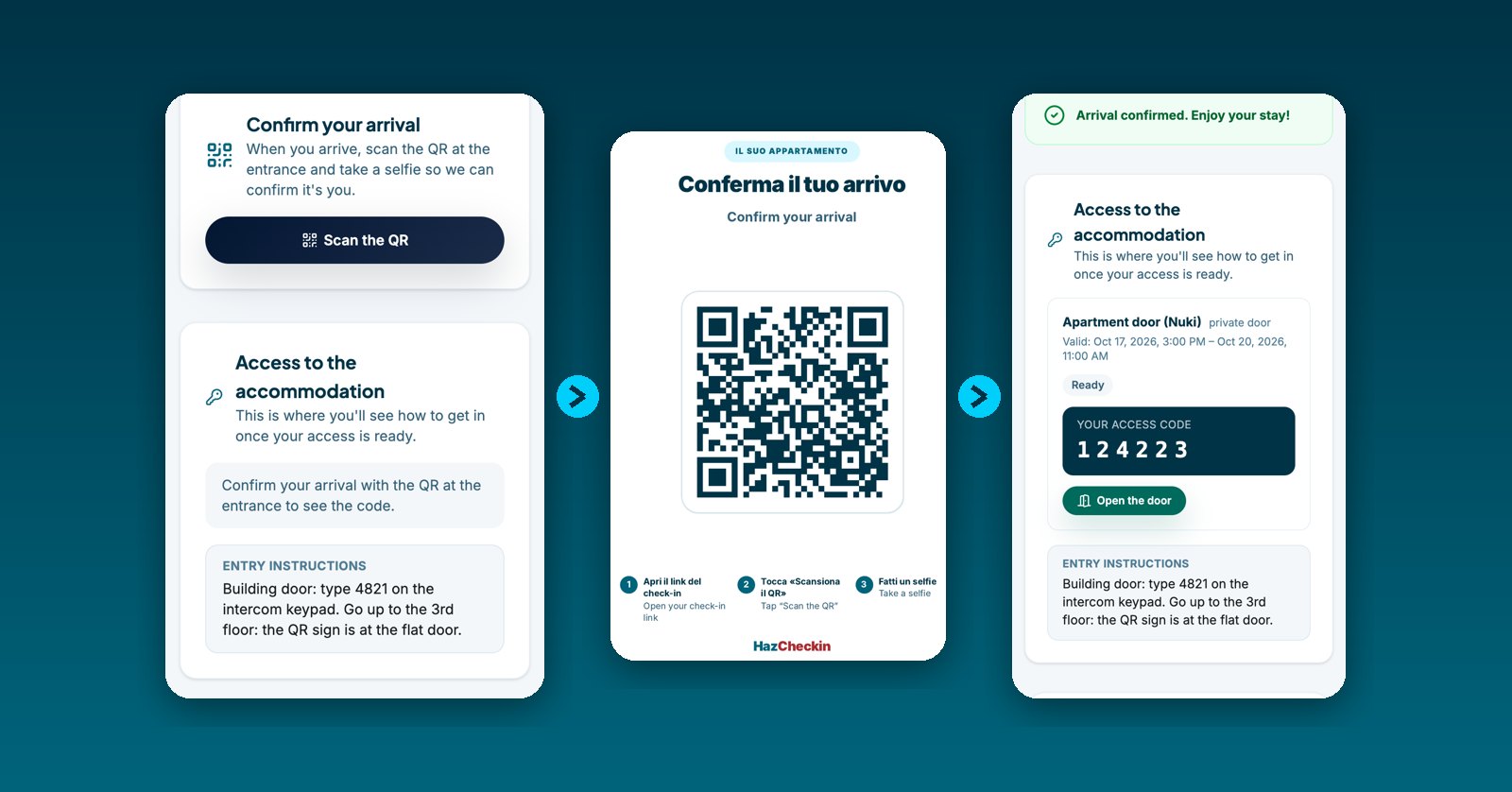
With a smart lock, guests no longer need you to hand over a key. One question remains, though: who is actually walking in? Anyone who has the code can use it, and online check-in on its own doesn’t prove that the person who registered is the one standing at your door.
HazCheckin’s new arrival check closes that gap. The code for the apartment door doesn’t appear until the guest proves, in front of that door, that they are the person who checked in.
How the guest gets in, step by step
- Online check-in, before arrival. The guest scans their ID, takes a selfie with liveness detection and signs. Nothing new so far.
- Building or shared door. Shared doors, such as the building’s street door, are never blocked. If it uses a fixed code, the guest finds it in the entry instructions on their page, so they can reach the apartment door.
- QR code at the apartment door. An A5 sign with a QR code hangs next to the door. The guest taps “Scan the QR” on their page, or scans it with the phone camera. From then on they have 15 minutes for the selfie.
- Confirmation selfie. Each adult takes a selfie. The phone checks it’s a real person (a printed photo or a screen won’t pass) and we compare the face with the one from check-in.
- The door opens. If it matches, the arrival is confirmed and the guest’s page shows their personal door code, plus an “Open the door” button when the lock is online.
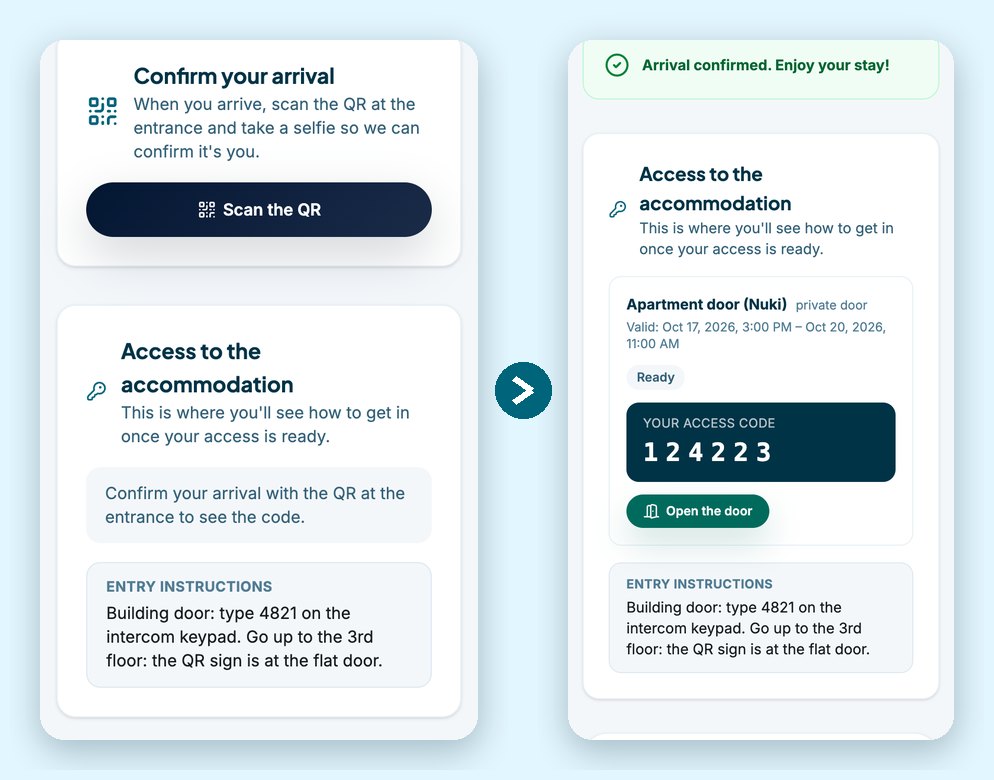
If the face doesn’t match, nothing is confirmed and the door stays locked. The guest can try again with better light.
The lock code, from booking to departure
- Booking confirmed. HazCheckin prepares access as soon as the booking arrives from Airbnb, Booking.com or your PMS.
- 24 hours before. The code is created on the lock, but the guest can’t see it yet.
- Arrival confirmed. The code appears on the guest’s page.
- During the stay. It only works between the check-in and check-out times you set (15:00 to 11:00 by default).
- Departure or cancellation. The code expires and is deleted from the lock. If the dates change, it updates on its own.
It works with the locks we already integrate: Akiles, Nuki, TTLock and Yacan. There’s nothing new to install: you download the ready-made QR sign from the dashboard. If someone photographs it, you generate a new one and the old one stops working.
Why it matters
In Italy it’s a legal requirement. Ruling no. 9101/2025 of the Council of State confirmed that guests must be identified by comparing the person with their ID, and that sending documents online and leaving the keys in a lockbox isn’t enough. Remote identification is valid when it happens in real time, at the moment of arrival. That’s exactly what this flow does. In Italy, the Alloggiati Web reports are also sent automatically as soon as the arrival is confirmed.
In Spain it’s a safeguard. The guest registration rules don’t require this step, but it protects you from what worries self check-in hosts most: someone other than the registered guest walking in, the code being passed around among friends, or a booking turning into a party with unidentified people. If you want to know why a scanned ID is no longer enough, we explain it in identity verification and liveness detection.
How to turn it on
- Connect your lock in the dashboard (here’s the Nuki guide) and assign it to the apartment door.
- In the property settings, turn on the arrival check and download the A5 sign.
- Print it and put it next to the apartment door, past the street door.
The arrival check is included in the Enterprise plan. You can see everything else in features.